Gaming
Valve's 2026 Steam Controller: Key Features
4 min read
03.05.2026
Discover Valve's 2026 Steam Controller: deep Steam Input customization, Grip Sense, dual trackpads, and low-latency puck for gamers. Read gaming news.
Valve's new Steam Controller: what you need to know
Most PC gamers already have a controller they enjoy using with Steam — a Sony DualSense, an 8BitDo Ultimate, a Nintendo Switch Pro, or something else. Part of that loyalty comes from Steam treating those devices like native controllers, and from Steam Input's deep customization options. Valve's 2026 Steam Controller builds on that foundation, packing many Steam Deck inputs into a single gamepad and adding unique sensors and controls you won't find elsewhere.
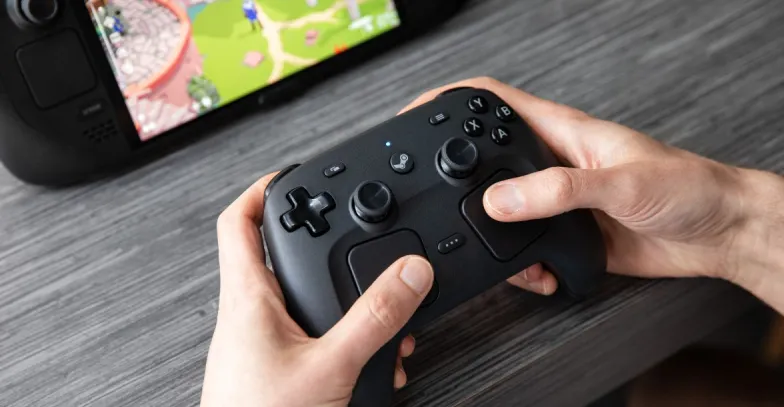
Key features at a glance
- Dual trackpads: Like the original Steam Controller and the Steam Deck, this pad includes twin touchpads for precise aiming and gesture controls.
- Grip Sense: Touch-sensitive grips detect when you hold the controller and can be mapped to any input.
- TMR joysticks: Drift-resistant magnetic joysticks designed to maintain accuracy over time.
- Four rear buttons: Easier to press than the Deck's paddles, useful for quick in-game commands.
- 2.4GHz USB-C puck: Magnetic charging dock that doubles as a low-latency receiver and pairs quickly with a satisfying snap.
- Bluetooth and wired modes: Use Bluetooth, the 2.4GHz puck, or plug in via USB-C for wired play and charging.
- User-repairable design: Replacement parts will be available through outlets like iFixit, making long-term maintenance easier.
"It's basically a Steam Deck without a screen: heavy on inputs, light on display."
Why customization matters
Steam Input lets you create multiple control schemes for different scenarios: flight, on-foot, menus, and more. You can switch schemes with a button press. The controller also supports on-screen radial menus that appear when you press a button or touch a trackpad, revealing custom commands such as weapons, spells, or consumables.
That level of customization remains Steam's strongest selling point. The new controller expands possibilities with Grip Sense and touch-sensitive sticks, enabling creative mappings. For example:
- Map a firm grip to activate a No Man's Sky Pulse Drive instead of pressing multiple shoulder buttons.
- Assign holding the left grip to sprint in Marathon rather than clicking the stick.
Those subtle changes can make gameplay feel more intuitive. The Steam community typically shares and iterates on control schemes, so expect many community-made profiles to appear quickly.
Performance and latency
Valve says both Bluetooth and the custom 2.4GHz puck show similar latency: around 8ms after a button press. In practice, 2.4GHz maintains more consistent latency when multiple controllers connect, which matters for local multiplayer.
The included USB-C-to-A cable (about five feet) helps position the puck for better reception. While line of sight isn't required, keeping the puck accessible improves signal quality and makes magnetic charging convenient.
Comfort, build and battery
The controller feels refined compared with the original Steam Controller and the Steam Deck's gamepad. It uses a textured, slightly gritty plastic that feels premium and weighty without being cumbersome. Battery life is long, and overall build quality is improved. The controller also wakes a PC or Steam Deck from sleep when you press the Steam button.
How it compares to premium "pro" controllers
The new Steam Controller is not a direct rival to pro controllers like Sony's DualSense Edge, Microsoft's Xbox Elite Series 2, or Razer's Kaiju V3 Pro. Those devices offer swappable sticks, trigger stops, and extensive onboard profile storage. The Steam Controller lacks swappable stick caps and trigger stops and does not store profiles onboard.
Where it stands out: dual trackpads, touch-sensitive Grip Sense, four rear buttons, a Steam Quick Access button, deep Steam Input integration, and a much lower price point. For many users, that combination delivers exceptional value.
Profiles, account linking, and sharing
Although the controller doesn't keep profiles locally, Valve tracks each controller with a unique identifier. That means your saved control schemes travel with the controller across different PCs and Steam accounts. This keeps personalization intact when plugging into another machine.
Who should buy it?
- Buy it if you love deep customization, play on a Steam Deck, or want features like Grip Sense and twin trackpads.
- Consider sticking with your current controller if it suits your needs and you rarely remap controls. Popular gyro-equipped controllers such as the DualSense or 8BitDo models still work very well with Steam.
At $99 and with orders opening May 4, the Steam Controller offers a compelling mix of unique inputs and affordability. It's especially appealing to players who value Steam Input's flexibility or those who host local multiplayer sessions where the 2.4GHz puck shines.
Questions or next steps
If you want more details about specific features, comparisons to other controllers, or setup tips for Steam Input and community profiles, ask away. We'll also host a subscriber AMA at 3 PM ET to dive deeper.
Follow gaming news and updates to see community configurations and hands-on impressions as more people test the controller in the weeks after release.
By Cameron Faulkner
 TGLIST.COM.UA
Comments
No comments
Add Comment