Tech
Kindle Scribe Colorsoft Review: Paper-Like Notes in Color
5 min read
08.02.2026
The Kindle Scribe Colorsoft adds color and AI note tools to an 11" e-ink tablet. Great for annotators and students, pricey for casual readers.
Overview: Who should buy the Kindle Scribe Colorsoft?
If your main goal is to mark up, highlight, and annotate e-books and documents — and occasionally scribble notes — Amazon's Kindle Scribe Colorsoft is worth considering. It combines an 11-inch, writable color e-ink display with pen input. For most people, though, the price will be hard to justify compared with cheaper Kindles or a multipurpose tablet like the iPad.
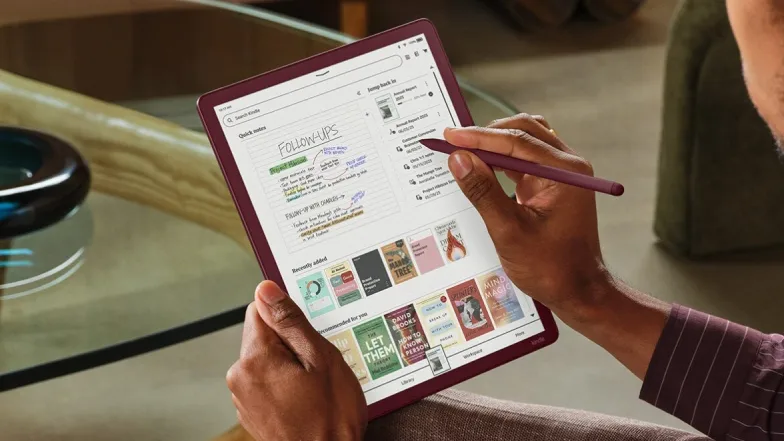
At launch, the Scribe Colorsoft starts at $629.99 for 32GB; a 64GB model and a Fig color option cost more. If you already planned to buy the 11-inch Kindle Scribe ($549.99) with a standard paper-like display, upgrading to the Colorsoft for the added color may make sense.
Price and positioning
Both the Scribe and Scribe Colorsoft sit in the premium e-ink tablet segment, competing with devices such as reMarkable. Compared with a traditional Kindle ($110) or Kindle Paperwhite ($160), these models are luxuries for most readers. Amazon seems to be carving out a niche for readers who need pen-enabled annotation more than multimedia features.
Who benefits most?
- Students and researchers who annotate papers and textbooks.
- Professionals who review and mark up PDFs, reports, or meeting materials.
- People who keep daily journals or elaborate to-do lists and will use the device every day.
Best as a specialized productivity tool — not a replacement for an iPad's many capabilities (streaming, apps, gaming, etc.).
Design, display and battery
The Scribe Colorsoft uses a textured, oxide-based e-ink display that feels like paper and reduces glare. The screen supports color, though tones are muted compared with LCD or OLED panels. Amazon says the 2025 model is 40% faster when turning pages or writing, and in practice page turns feel snappy and handwriting is responsive.
- Size and weight: 11-inch display, 5.4mm thick, 400g — lighter than many tablets and easy to carry in a tote or large purse.
- Battery life: Up to 8 weeks between charges depending on use, thanks to low-power e-ink technology.
- Adaptive display: Auto-brightness and adjustable warmth for night reading.
Touch, pen and writing experience
The touchscreen works well for e-ink, but it feels less responsive than LCD or OLED touchscreens. Gestures such as pinch-to-zoom can show a slight lag.
The included Premium Pen does not require charging and is designed to mimic a pen-on-paper feel. It has a rounded body (no flat side to magnetically charge like Apple Pencil), so grip and slipperiness are considerations. Pen tips wear down and need replacing; a 10-pack runs about $17.
- 10 pen colors and 5 highlight colors included.
- Four stroke styles: pen, fountain pen, marker, pencil; multiple widths available.
- Shortcut button (press-and-hold) defaults to highlight but can be disabled to avoid accidental triggers.
Notebooks, templates and editing tools
The Scribe's Workspace organizes Quick Notes and Notebooks. You can create documents from many templates: blank, ruled, dotted, graph, meeting notes, Cornell Notes, planners, music sheets and more.
Editing tools include a soft-tipped eraser (flip the pen), a precision eraser with selectable widths, and a Lasso tool to move, copy or resize selections. Erased content may leave a faint ghost briefly due to e-ink refresh behavior.
Document support and import/export
Read and annotate e-books and PDFs. Import Word docs and other files directly from Google Drive and Microsoft OneDrive, or use Send to Kindle. Supported file types: PDF, DOC/DOCX, TXT, RTF, HTM, HTML, PNG, GIF, JPG/JPEG, BMP, EPUB. Notebooks can be exported to Microsoft OneNote.
AI features and handwriting recognition
The Scribe Colorsoft adds AI-powered tools to improve productivity:
- Neaten handwriting and straighten highlights/underlines.
- Handwriting refinement converts scrawl into selectable handwritten-style fonts (Cadia, Florio, Sunroom, Notewright) rather than standard typed fonts.
- AI search scans your notebooks; Ask Notebooks AI answers questions about your notes.
- Future planned features include Ask this Book (spoiler-free Q&A about passages) and Story So Far (context summary to catch up on a book).
The AI is useful but imperfect: it can decipher messy handwriting sometimes, but struggles when notes overlap or multiple scribbles crowd a line.
Active Canvas and margin notes
Active Canvas reserves space for notes inside documents and e-books. Your annotations stay anchored to the original text even if you change font sizes or reflow the content. You can also expand margins to take notes without writing directly on page content.
Performance issues and tradeoffs
Overall the device performs well for reading and annotation, but you should know the downsides:
- E-ink color is muted; not ideal for high-fidelity art or gaming (see gaming news on dedicated devices for that use case).
- Touch responsiveness lags compared with iPads and other LCD tablets.
- High price: cases and accessories add to the cost — cases start at $139.99.
- Minor freezes have been reported when highlighting; recovery requires returning to the Home screen.
Specs and buying options
- Colors: Graphite (Black) and Fig (limited); Fig shipped Jan. 28, 2026 in 64GB at higher price.
- Storage: 32GB ($629.99) and 64GB ($679.99) models.
- Accessories: Premium Pen included; cases and extra pen tips sold separately.
Who should buy the Kindle Scribe Colorsoft?
Buy the Scribe Colorsoft if you frequently annotate academic papers, legal documents, or long-form reading material and you value a paper-like writing experience with color annotations. Skip it if you need a multipurpose tablet for streaming, apps, gaming, or high-performance drawing — an iPad or dedicated tablet will be a better choice.
Quick pros and cons
- Pros: Paper-like feel, long battery life, color annotation, strong document support, AI note features.
- Cons: High price, muted colors, slower touch, limited app ecosystem, replaceable pen tips.
Final takeaway
The Kindle Scribe Colorsoft targets a focused audience: readers and professionals who need pen-based annotation on an e-ink canvas. It excels at note-taking, document markup, and long-reading sessions without eye strain. For anyone seeking a general-purpose tablet (and especially those interested in gaming news and app-driven experiences), an iPad or similar device will likely provide better value.
 TGLIST.COM.UA
Comments
No comments
Add Comment