Gaming
Abxylute M4 review: clever idea, flawed execution
4 min read
01.02.2026
Affordable magnetic smartphone controller with good ergonomics but weak mount and stiff joysticks. A promising idea that needs refinement.
Overview
As a retro gaming fan, I was excited when Apple opened its App Store to emulators in 2024. I wanted a controller that would let me fully embrace retro gaming on my phone. Clamp-on controllers like the Backbone Pro felt too bulky, and I didn't want to prop my phone up to use a standalone gamepad. The Abxylute M4 promised a different approach: a compact wireless controller with a magnetic mount for iPhone. It's a clever idea, but in practice several design choices hold it back.
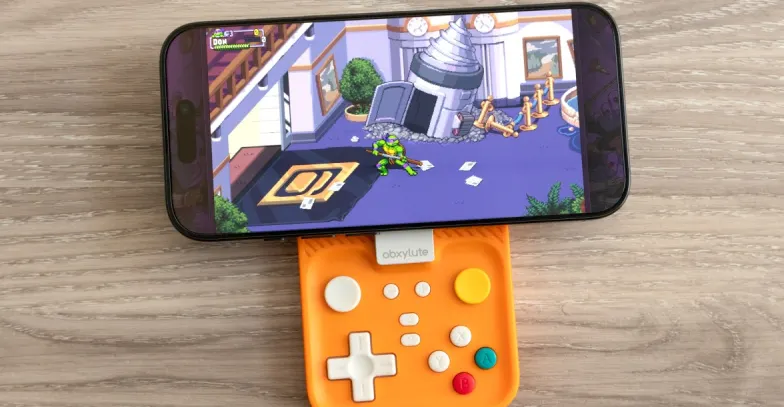
What the Abxylute M4 Is
The M4 consists of two parts: a rectangular Bluetooth gamepad and a Q-shaped magnetic mount. The mount attaches to MagSafe iPhone models and the Google Pixel 10 Series. Abxylute also includes an adhesive metal ring to make other phones compatible.
Key features
- Bluetooth wireless gamepad with action buttons, D-pad, two analog joysticks, and two pairs of shoulder buttons.
- Magnetic mount compatible with MagSafe and select Pixel phones; includes adhesive ring for other devices.
- Mount doubles as a ring-shaped kickstand for hands-free viewing.
- Compact form intended to make your phone feel like a handheld console.
The Abxylute M4 aims to turn your smartphone into a handheld console, but a few practical issues undermine that promise.
Magnetic Mount: Strong, but Not Foolproof
The ring of magnets on the M4's mount sticks to my iPhone as securely as many MagSafe accessories and Qi2 chargers. The mount's finish lets you rotate it so the controller hides behind the phone rather than hanging off the side. It also works as a kickstand.
However, the full assembly is bulky and thick. It's hard to slip into a pocket, so I often remove the mount when not playing. This defeats some convenience the design promises.
Orientation limitation
The M4 only works well in landscape mode. When attached, it doesn't protrude far enough from the bottom of the phone for comfortable portrait play. That's a drawback for fans of vertical handheld gaming—think Game Boy-style play. Newer alternatives, like the GameSir Pocket Taco and 8BitDo FlipPad, support vertical orientation.
Connection Between Mount and Controller
A major concern is the magnetic connector that links the mount to the controller. While the magnet makes the controller snap into place, the joint doesn't always feel secure under real-world movement.
- The connection holds fine while you're steady, but it can separate at certain angles or after an accidental bump.
- Turning the assembly upside down often causes the mount and controller to disconnect, which risks dropping your phone.
- Some users, including reviewers at Retro Dodo, have reported the same behavior. Lighter phones may reduce the problem, but many modern phones are heavy and expensive.
Given the cost of flagship phones (my iPhone 16 Pro was nearly CA$1,500), relying on the M4's magnetic joint feels like a risky choice.
Standalone Controller Performance
The M4 also works as a standalone Bluetooth controller for phones, consoles, or any device that supports gamepad input. In this mode it performed better than I expected.
- The square-shaped design accommodates large hands. Shoulder buttons are easy to reach without contorting fingers.
- Action buttons have a pleasant resistance despite being small. The D-pad is large enough for big thumbs but feels a bit mushy, occasionally registering diagonal inputs.
- There are two pairs of shoulder buttons, useful for modern control schemes and emulated console layouts.
Analogue sticks: the weak link
Abxylute bundles two analog joysticks using a sliding disc design similar to the Nintendo 3DS. On the M4, these joysticks are too stiff. Subtle movements become difficult and sustained play causes thumb fatigue. In racing games like Mario Kart World, my thumb ached after only a few races. If precise analog control matters to you, choose a different controller.
Price and Value
At US$49, the Abxylute M4 is an affordable option to make your smartphone feel like a handheld console. It offers clever ideas and solid standalone ergonomics. But the weak magnetic joint, lack of portrait-mode support, and stiff joysticks make it a mixed value proposition.
Who Should Consider the M4?
- Buy it if you want a cheap, compact Bluetooth gamepad with decent ergonomics for casual play and don't plan to rely on the magnetic mount.
- Avoid it if you play vertically, need precise analog controls, or plan to trust an expensive phone to the magnetic mount during active play.
Conclusion
The Abxylute M4 shows clever design thinking and offers good standalone controller comfort for its size. But its magnetic mount and stiff joysticks undermine the handheld-console promise. For retro fans following gaming news, the M4 is worth watching as an interesting step in mobile gaming accessories, but it falls short of being a reliable everyday solution for flagship phones.
Photos by Andrew Liszewski / The Verge
 TGLIST.COM.UA
Comments
No comments
Add Comment