Gaming
Asus ROG Falcata Review: An Ambitious Gaming Ergonomic Keyboard That Falls Short
3 min read
08.12.2025
Asus ROG Falcata review: an ergonomic gaming keyboard with Hall Effect switches, offering deep customization but limited ergonomic features.
Asus Falcata is an ambitious split ergonomic gaming keyboard that does not meet all expectations. While keyboards with Hall Effect technology are not uncommon in the gaming industry, the Asus ROG Falcata is unique in combining this technology with a split ergonomic design aimed at reducing strain on the wrists and hands. This luxury comes at a price of $419.99 — enough to separately purchase a good Hall Effect keyboard and an ergonomic model. The cost is justified if the Falcata could truly offer the best of both worlds, but my impressions are quite mixed.
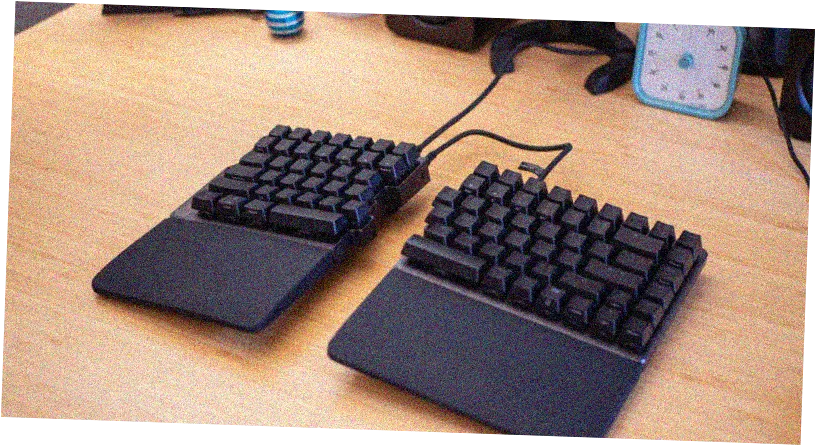
As a Hall Effect keyboard, it performs well, offering numerous adjustments, including the ability to fine-tune the actuation point of each key to the hundredth of a millimeter. However, if you are buying it for ergonomics, it may not be the best option. My biggest concern was the limited tilt angles — only up to seven degrees (or six when using wrist rests). In comparison, my Kinesis Freestyle Edge RGB has a tilt of up to 15 degrees, and some users prefer even more. It is important to test which tilt suits you, but at this price, Asus could have offered more tilt options and longer USB-C cables for connecting the halves.
The maximum distance between the halves is only 10 inches, making it difficult to spread your arms as wide as needed for comfort (in my Freestyle, the cable is non-detachable and up to 14 inches long). You can use your own longer cable, but at this price, it feels like an oversight. Despite the limited tilting, the Falcata has many advantages. It features a 75% key layout, making it easier to transition from a standard keyboard. Its design is more elegant and compact, and the halves can be connected just like a regular keyboard, which is convenient for travel. Additionally, it operates very quietly, as most switches are quieter than Cherry MX Blue.
The keyboard is packed with gaming features: it supports Rapid Trigger and Speed Tap — functions that provide an edge in competitions. It works both wired and wirelessly (Bluetooth or 2.4 GHz), with a polling rate of up to 8000 Hz in all modes except Bluetooth. The advantage of Hall Effect switches is their analog nature, allowing for adjustable actuation distance for each key. This provides very fast responses and minimal finger movement, but by default, it can cause accidental presses while typing.
Asus offers several ways to customize sensitivity, including through the Gear Link browser app or the multifunction wheel on the keyboard. Gear Link allows for quick macro assignments, sensitivity adjustments, and the use of Dynamic Keystroke — up to four commands depending on the depth of the press. For example, a light press of the W key simply sends W, while a full press can additionally activate Shift and R for running and reloading simultaneously. Rapid Trigger allows reactivating a key without fully releasing it, while Speed Tap enables moving in two directions simultaneously in the last active command, giving an advantage in games, but is prohibited in Counter-Strike 2.
In summary, the Falcata is worth considering only if you truly value Hall Effect and split ergonomics. Given the limited tilt and its uniqueness, it is advisable to test the keyboard beforehand, as local stores may not have it available for review. If Hall Effect is not a necessity for you, a great alternative would be the Kinesis Freestyle Edge RGB Plus — at a lower price, with better ergonomics, but with louder mechanical switches and without Hall Effect.
 TGLIST.COM.UA
Comments
No comments
Add Comment